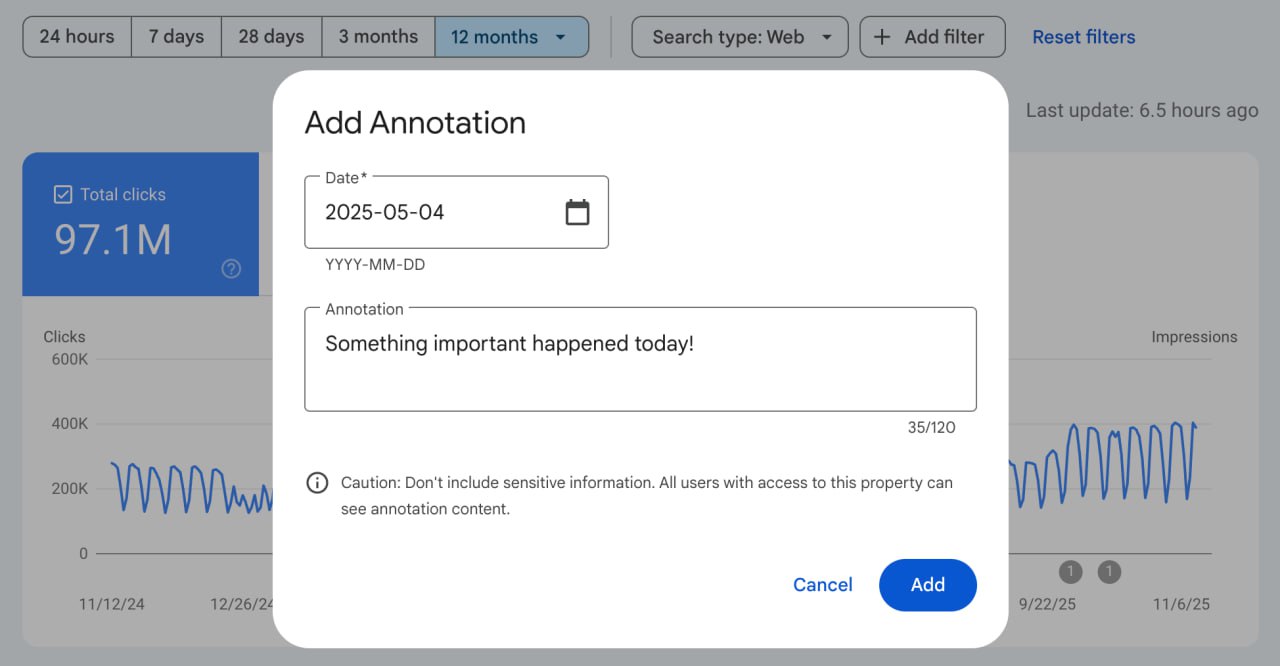
Annotations in Google Search Console
The GSC now has the ability to add abstracts on the report chart.
To add an annotation, you need to:
- Go to the «Efficiency» report»
- Right-click on the graph - add note
- Specify the date of the required event and the text itself (limit: 120 characters)
What is it for?
- Linking changes to deliverables. Annotations allow you to link specific actions on the site (content updates, adding a new section/pages, technical edits, etc.) with subsequent changes in traffic, which makes analytics more accurate.
- Quickly understand the reasons for spikes. If the traffic suddenly increased/decreased, the note helps you to immediately remember what exactly happened that day (especially if the spike is related to a specific page/section and there is a corresponding note about it).
- Better team interaction. Annotations turn GSC into a «mini road-map»: any specialist can see who did what and when (if you write about it in a note).
- Accelerated diagnosis of problems. When indicators drop, it is easier to determine if it is related:
- meta-tagged
- with content updates
- with the introduction of new functionality
- technically defective
- etc.
5. Objective evaluation of work efficiency. Abstracts allow you to compare metrics before and after the implementation of tasks, and understand what really worked and what did not.
6. Track external factors and then analyze their impact on search traffic:
- Google updates
- hosting problems, DDOS attacks
- seasonality
7. Simplify audits and reporting. When analyzing quarterly/yearly, you immediately see the history of key events, which makes reports more accurate.
8. External Evaluation. If the project moves to another specialist, or you want to order an external audit - it will be much easier for the other person to understand what was going on with the project from your notes.
9. Accuracy of hypotheses and experiments. If you are testing:
- new meta tags
- relinking
- or you're conducting A/B tests, related to traffic, positions or CTRs
Tho annotations make it easy to track the impact of your experiment on key metrics.
I've been keeping such notes in Yandex Metrics for a long time and it really facilitates future analysis of projects, as well as allows you not to keep in your head a bunch of changes to the site and remember their dates