Main » Articles » Checklist for internal page optimization
19.08.2025 (15:24)
19.12.2025
SEO and Promotion, Guides and Training
Let's review basic internal ranking factors that are worth paying attention to when optimizing sites in 2025 for Google (for Yandex, too, will not be superfluous). Some of the factors presented below have more influence on the ranking of the site, others less.
Let me just make a quick note 5 main factors, that you should definitely implement on your site, which will bring a significant «plus» to the reputation of your site.
That's it, you don't have to read any further, the other factors affect much less on the reputation of the site. I'm kidding, of course! The following is a list of internal site optimization work, current for 2025. I believe that these works will allow you to raise any site to a significant level higher and get more visibility on search queries.
Okay, here we go.
The main query at the beginning of the Title
If possible, write the Title tag starting with the main keyword query (that would read normally). This is considered one of the most important factors on the pages of the site. This tag allows search engines to understand what the main topic of the page is.
Additionally, the plugin will help you with Title and Description tag settings Yoast SEO for the WordPress engine.
Main header
Be sure to check that your website theme outputs the first, main header in the tag <h1></h1>. It should be on the page in a single copy.
Also, be sure to use your main keyword query in the first title. But the first title should not be a duplicate of the Title content.
The main key query in the URL
The presence of a page's main keyword query in the URL is also a ranking factor (albeit a minor one). But do not put long queries in the URL, it can only hurt. And certainly the URL should not consist of an incomprehensible set of characters. It is necessary to form CNC (human-like URLs), by default in English letters (use transliteration plugins, eg. Cyr-to-Lat).
Page URL length
The shorter and clearer the URL structure of your site, the better it is for search engines. It makes your page clearer to search engines and allows for faster browsing of the sitemap. It will also make it easier for users to remember the page address.
The main query in the description
Description is a page description tag intended for search engine crawlers. It should briefly describe the content of the page.
The length should be approximately 120-140 characters
The description should be honest (don't write something that isn't on the page)
Include the primary keyword
You can stand out from your competitors by adding Emoji in your description
It is important to organize your website page in such a way that the user can easily and quickly navigate through your content and can easily find the answer to their query.
Clear, easy-to-read headings and subheadings
Infographics, images, videos
Breaking text into paragraphs
Use of lists, italics, formatting with quotes, «attention» blocks, etc.
Structuring information with tables
Links to pages and sites with related information
Making it easy to get the information you are looking for is one of the main aspects of SEO.
Creating unique content
Search engines strive to show users content without duplication. Why would a search engine show multiple pages of a site or multiple sites that have the same content.
Therefore, when creating content, it is important to strive not only to make a page that is as good as a competitor's page, but also to surpass it, to add something new and unique.
Avoid cannibalization - don't make multiple pages on your site with similar or identical content.
Write only unique texts
Create unique infographics (images, videos, charts, graphs) where possible
Make and use unique videos
Create page content as good as your competitor's, or even better.
Surpass your competitor with quality, not quantity.
Content reading level
Keeping track of your content reading level - what does that mean? - Google once labeled content as Basic, Intermediate, Advanced. In fact, it was an assessment of the style and complexity of the written text. Now Google does not show this feature, but we should assume that it is one of the ranking factors.
For most sites it is recommended to write simpler texts, this ensures that the content will be available to the maximum number of people. But it all depends on the topic of your site. For example, a scientific site can have a more complex structure of text writing, which will not harm it at all.
What to focus on when writing content in the moment? - all you need to do is use the plug-in Yoast SEO or Rank Math, which provide quite a lot of information about your text as it is being written. Follow the advice of the plugins.
Basic query in the first 50-100 words
It is believed that the earlier your main keyword query appears in the content, the faster search engines will be able to determine the essence of the content. This rule should be followed on all pages of your website.
From the above, we can conclude that it is important to consider finding the main keyword query:
at the top of the title
in the description content
in the first H1 header
in the first 50 words of the page content
Don't forget about it, make sure to check it when publishing content.
H2, H3 Heading Structure...
Your page content should have a proper and logical header structure. That is, you need to follow the correct placement of headings in the hierarchy:
H2
H2
H3
H4
H3
H3
H2
This will allow search engines to properly understand the essence of the content and users to navigate through the text more easily.
Using LSI queries
LSI (latent semantic indexing) keywords are words related to targeted keyword queries. Search engines use them to better understand the content.
For example, for the query «lock», these can be related words of two kinds:
Medieval, stone, English, royal.
Iron, reliable, on the gate, mortise-and-tenon
The word is one word, but related words are completely different, helping to understand the essence of the query and pick up relevant sites in the rendition.
Also LSI words can increase page traffic at the expense of other related keywords.
It's not uncommon to have pages that rank for a major keyword query, but whose content doesn't even contain that query. This happens with topics that are closely related to each other or have different spellings but the same meaning.
Example:
Plastic windows
Eurowindows
The glazing - it's got a place
For all queries the user is looking for the same product, so sites will be ranked by synonyms as well.
Query word order
Whatever product or service you're promoting, people may search for it in a search engine, specifying the spelling of the query in completely different variations. Your task is to collect all possible keywords on the topic and use them (if possible) in the form and in the order of words, as they were used by users in the search. But you should not make it absurd with phrases like
«you can buy plastic windows from us price Moscow the most favorable among all companies»
To avoid such «non-human» phrases, use punctuation marks, divide such queries into different components, use similar combinations of keywords with increased density in the text segment.
«at us you can buy plastic windows at a price below the market price. Delivery in Moscow is free of charge.»
Volume of content like competitors
In general, there is not some ideal content size for search engines. For each topic, for each query, it can be completely different.
When I worked in website promotion companies, there (for some reason) the standard was that the text should be an average of 2500 characters, no matter what the topic. More or less written text is very rare. The companies are famous.
So, as a starting point, I recommend focusing on the size of your competitors' content. Do about the same amount, and even more.
But this does not mean that it will be enough to write 3 times as much text as your competitors. It is more important that this text be on topic, without «water», readable, structured and responsive to user requests.
Again: do like your competitors and even better (quality).
Depth of content content
Your website content should not be superficial. If you're writing instructions on how to change a tire on a car, it shouldn't look like:
Raise the car
Unscrew the bolts on the wheel
Remove the wheel
Install the spare tire
Screw in the bolts
Make the content in such a way that it immediately answers all possible questions that may arise when reading it. Make the content «deeper» and more detailed.
Secure the vehicle with the parking brake to prevent accidental movement.
If the tire is changed on the side of the road or with limited visibility - erect an emergency sign
Loosen the wheel nuts with a wrench by turning it counterclockwise.
Place the jack on a level surface with the jack resting on a special point on the frame or chassis.
…
The more and more detailed the information, the more valuable it will be to search engines.
Content Update
Google shows the date when pages were last updated in search results, which can help with increasing your site's clickability in the search results. Also, up-to-date information is more valued and favored over content that hasn't been updated in a while.
Who will choose the 2015 «Best Chinese Cars» article over a similar article from 2025?
Spelling and grammar
Spelling, grammar, and font type carry weight. And if small errors and misspellingstypos will not negatively affect the page ranking, while illegible and meaningless content will have a significantly negative impact.
Multimedia
Use different types of content: images, videos, graphics. They help increase users' time on the site, reduce bounce rates, increase the number of reposts on social networks, increase the value of your content and attract backlinks.
Image alt tags
This alt tag helps search engines interpret images. Now search engines know how to read graphic information from images and understand what they depict, but not with 100% accuracy. So you need to help them with this by specifying the alt tag.
Don't overuse keyword queries when writing the alt image.
EXIF image data
EXIF - metadata embedded in the image file that contains information about the photo. Often when using plug-ins and image optimization services - this metadata is removed.
But, this point should be considered on those sites that can receive potential traffic on images. If you have a site with a suitable theme, you need to check the availability of EXIF data and in their absence - fill in the latter.
Image metadata provides search engines with additional information that can increase your image's ranking and visibility in search.
Unique images + metadata + alt + photo caption = fiery positions in image search.
Adaptability to mobile devices
Nowadays it is quite difficult to imagine the existence of a site without adaptability to mobile devices, but careful... Therefore, do not forget to check the fast and convenient display of the site on any device.
In 2015, Google began penalizing sites without mobile adaptation
As of 2018, mobile-first indexing is now available.
Roughly half of searches on Google come from mobile devices.
Google recommends using adaptive design. Adaptive design is now implemented in almost all modern templates. The easiest and without cost is to take some standard WordPress themes, you can even leave those that are installed with the cms by default.
Here, of course, depends more on what kind of site you plan to make. For a branded site for gambling is enough default template. For more complex sites it makes sense to look for a suitable template for your idea.
It is NOT recommended to use broken templates (Null). If you like the template and meets all your requirements, but is paid - it is better to pay once and more do not know the problems (for example, with updates)
You can buy a good template here: https://themeforest.net/ (search for the topic by tag Responsive - adaptive).
Site load speed
Page load speed is of great importance to search engines. Google has been using site load speed as a ranking factor since 2010.
Direct impact on ranking (under equal conditions, the page that loads faster will be higher in the search engine)
Conversion (every second a page loads on 7% worsens visitor-to-customer conversion)
Behavioral factors (the person will just leave for another site if yours takes a very long time to load)
If you do not understand at all how you can speed up the loading of the site with your own hands, then you can ask for help, for example, on the exchange kwork.ru (on average, the service will cost about 1000 rubles).
How do you speed up a website?
If you get it, here you go. 4 basic ways to increase the loading speed of your website for free:
Install the caching plugin
Optimize images
Lazy Loader (lazy loading) of images
Configure CloudFlare
Using HTTPS
Sites that use HTTPS encryption are given higher priority than sites with legacy HTTP. Therefore, the first thing to do when developing a website is to create an SSL certificate for the domain.
E.E.A.T. signals
E.E.A.T (Experience.Expertise.Authoritativeness.Trustworthiness) - A set of criteria for evaluating the quality, credibility and trustworthiness of your content.
E.E.A.T translates into Russian as «Experience, Expertise, Authority, Trust». E.E.A.T is part of Google's guidelines for evaluating search quality.
Experience: personal or real experience in the topic under discussion
Expertise: author's expertise, skills and knowledge of the topic under discussion
Authority: reputation of the author/site as a reliable source of information on a particular topic.
Credibility: honesty, accuracy, content security and page reliability.
Search engines want to know that you are a real, trustworthy business/information source that they can direct traffic to without fear.
How to improve E.E.A.T. signals?
There are a few basic items that wouldn't be hard to add to any website, but they will help improve E.E.A.T signals, here they are:
Company name, address, phone number. You can include your company name, address and phone number at the bottom of the site (in the footer). Also add this information to the «About Us» and «Contact Us» pages.
Add micropartitioning for the «Organization» type. Often it is enough to install and properly configure the plugin for this purpose Yoast SEO or RankMath.
About Us« page». Create this page and put information on it: about the company, a list of team members, short bios and links to their social media profiles (particularly LinkedIn).
Contact page« with all possible information on how to contact the company's representatives on various issues.
Increasing CTR of pages
It's important to work through every opportunity to increase your site's clickability (that's CTR) in search engine rankings.
CTR increase for every 3%, allows you to take a position in the rendition one position higher.
How can you increase the CTR of a website in the rendition? (I'm talking primarily about Google's English-language output):
Specify the amount of the discount in the snippet. The size of the discount gives 5-14% CTR. Can be specified in the visible part of the title.
Specify warranties. Warranties are 3-8% CTR. For the English-speaking audience, write something like «full warranties».
Asking a question in the title - yields an increase of 3 to 6% CTRs
Specify the phrase «It's not getting any cheaper» (It Doesn't Doesn't Get Cheaper) - increases CTR by 5-10%.
Emoji in Title and Description - read more about this below.
Micropatterning (rating, FaQ) - read more about that below.
Emoji in the snippet
Creatives with emoji ʕ⊙ᴥ⊙ʔ greatly increase attention to your snippet. CTR can be increased by 5-7%.
Schema micro markup is code that helps search engines better understand your content. It's an important thing to implement on your sites, for at least one simple reason. your site will be better displayed in search engine results, will stand out and attract more traffic.
It is because of Schema implementation that you can find sites that display images, rating (asterisks), additional links, and a block of questions with answers in the search engine.
Checking micro markup for errors
First of all, you need to check if you have micro markup on your site and if it works correctly. To do this, you can use these services:
A few recommended micropatterns to implement on your own site:
Rating (content score)
Ranking based on user ratings («stars») under the snippet of your site in the Google rendition. To implement on WordPress - you can use this plugin: https://ru.wordpress.org/plugins/wp-postratings/ The micro markup rating should be implemented in such a way that users can rate themselves. You should not automatically set page rankings (and no auto-tweaking), since 2014 Google has a filter for micro markup tweaking. You can get either disable micro markup for the site in the output, or to lower positions.
FaQ (Questions-Answers)
FaQ micropartitioning allows you to display a list of questions and answers in your site's snippet, which in turn makes you stand out among other sites and increases the height of your site's block. The simplest implementation is with the help of the previously mentioned plugin Yoast SEO.
After installing the plugin, when creating a new post, all you need to do is add a «Yoast Frequently Asked Questions» block and populate it (for an example, I added such a block at the very bottom of this article)
Outbound links
Using links to other reputable sites only adds value to your content. Links to sources, case studies, quotes - increase the authority of your page, show that you are trying to add something new and valuable. In general, place quality links to authoritative sites in your niche, but don't forget to use dofollow and nofollow tags.
For example, and wikipedia has it feature article, talking about search engine optimization of the site. You can read at leisure to expand your horizons, at least a block of articles with the history of the development of optimization and the relationship with Google.
Internal links (relinking)
Internal links are links from one page of a website to another relevant page on the same website. Internal link building is often ignored by website owners and this is a huge omission. Internal linking helps to make the site more search engine robot friendly and adds value to the readers as it gives it additional resources to read.
There are many different ways to automate the process of internal relinking, but I would recommend using the manual method - place links where it will really be useful for the reader and only to the material that will complement the current text in terms of meaning.
Searching for broken links
Periodically check the site for broken (not working) links that lead to non-existing pages (response code 404). Such links consume link weight and cause serious damage to site promotion due to behavioral factors (it will not be very pleasant to follow links to non-existent pages, which will lead to an increase in the bounce rate).
These links can be viewed for free in Yandex Webmaster (or Google Search Console), there are also plugins to track such links, for example Clearfy Pro (purchased once, no limit on the number of sites).
Other services for analyzing a site for broken links:
Duplicates and broken links should be excluded. With a large number of pages on the site, it is necessary to check for broken links and duplicate pages.
Increase dwell time on the site
You need to improve the quality of content to increase the time users spend on the page/site. This will help search engines understand the relevance of the content to the query and the usability of the content.
The user left immediately - page is marked as low-quality content
The user was a few minutes - is marked as medium
Took a long time - page is marked as quality
Of course, much depends on the query itself. If it implies a short answer - then the time of staying on the site for a few seconds will be quite natural and here another part of behavior will be taken into account: whether the user will close this search cycle or will go to other sites to look for an answer to the same query.
Once again, we are back to the previously mentioned thought: make quality content and provide it conveniently.
Failure rate
Officially, search engines (at least Google) report that bounce rate does not affect a site's ranking. But tests and observations do not agree with this.
What is a bounce rate? - is the number of people who visit your page and leave without going to at least one other page.
This is where the point about internal links (relinking) comes to mind, as well as the creation of useful quality content that answers in a convenient form to possible questions of visitors.
«Quality» of the site in the GSC
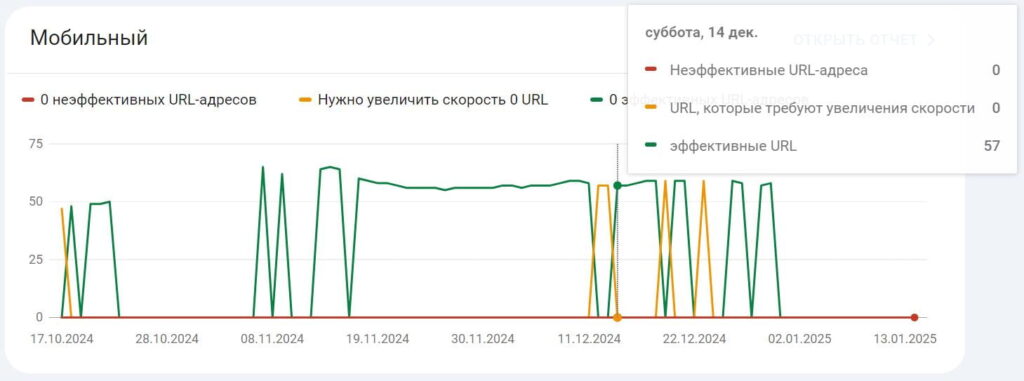
Analyze experience reports on the pages of your website. It is provided free of charge in Google Search Console - Quality« section in the left menu. It contains two subsections:
Core Web Vitals: indicators of real user data on page load speed, interactivity and visual stability. That is, it shows which pages Google considers ineffective and which pages with problematic loading speeds are effective.
HTTPS: whether your site is secure.
Core Web Vitals are an important part of evaluating the quality of user interaction with your site. The better the interaction - the more traffic.
There are three main indicators of Core Web Vitals:
Largest Contentful Paint (LCP) - measuring the performance of the load
Reports are broken down separately into Mobile and PC. Prioritize the Mobile report as the most important report to investigate and fix. Google immediately tells you exactly what you need to fix to fix problems.
Your goal is to ensure that there are no errors in these reports. I recommend checking these reports once a month.
Pop-ups
Avoid implementing pop-ups for mobile devices - Google has become very strict about them. You can seriously damage your site's ranking «in the eyes» of Google.
Basic rule: don't show on mobile devices pop-ups and lightboxes, that prevent people from reading or scrolling through content.
This doesn't mean that you should do away with pop-ups completely, just make them small enough that they don't interfere with users' ability to interact with the page content.
Here is such a list of internal optimization of sites in 2025, when implemented, you will significantly pump your project and get higher positions in the search engine.
Now let's take a look at the Question-Answer block from the Yoast SEO plugin, which has the necessary micro markup.
Answers to frequently asked questions
What is internal optimization?
This is a set of measures aimed at working out the pages of the site, their code and content, for better ranking in search engine results. In simple words, internal optimization is work with the site itself, the purpose of which is to achieve greater loyalty on the part of search engines and as a consequence of better positions and more traffic.
What does internal optimization include?
It includes any work carried out on the site in order to improve the quality of information content and provide it to users in a convenient form. Site development to improve the quality of the site. Here is a list of some of the works included in the internal optimization: correct writing of meta tags title, description, headings h1, h2, exclusion of broken links, a set of works to increase the speed of loading pages, image optimization, adding micro markup, creating a convenient and correct structure of the site, etc.
What is external website optimization?
External optimization of the site - a set of measures outside the site, aimed at improving the ranking of the site in search engines. Most of the external optimization is the work on building up the link mass. It also includes work on brand awareness, work with maps, adding information to thematic catalogs, maintaining social networks, etc.
How to optimize a website on your own?
To independently optimize the site, you need to have a basic knowledge of SEO. If any, then it is enough to go step-by-step through the checklist, as well as in-depth study of the work with the selection of keywords and content provision.
How much does it cost to optimize a website internally?
If we consider the Russian-speaking market, the average cost of internal optimization of the site will be about 20-30 thousand rubles. Of course much for the formation of the cost depends on the theme of the site, the volume of the site, the region of promotion, engine, etc. As a result, the price tag may be 5 000 or 100 000 rubles. Each project should be evaluated individually.
What's the most important thing about internal optimization?
I would call the most important thing in internal website optimization - quality content. In fact, it is the base. You won't get far with shitty content, even if you «lick» the site to a perfect state. And it absolutely must be done: - correctly add main keywords in title, description, h1, first 50 characters of text. - adaptation of the site for mobile devices. - excellent loading speed of the site pages. - quality internal linking - good, unique text with the addition of multimedia, tables, prices, graphs (depending on what the theme of the site).
В статье обсуждаются методы восстановления старых дропов из веб-архива, использование инструментов для текстовой релевантности и влияние возраста дропа на его траст.
Узнайте, как масштабировать сетки в гэмбле в 2025 году, избегая ошибок и сохраняя индивидуальность каждого сайта. Читайте о секретах успешного продвижения без следов.
DICE.expert is an independent analytics platform for iGaming, SEO and digital marketing.
We collect data from official sources, structure information about markets, companies and technologies, and make the industry more transparent and understandable for professionals.
DICE.expert is not an online casino and does not provide access to gambling.
All information is available for educational and analytical purposes only.